


When Forced Quorum Mode Haunts You
It was a regular Thursday afternoon. The kind where you're wrapping up tasks, maybe thinking about what to have for dinner. And then, at 4:36 PM, the alerts started rolling in.
Transaction processing delays. Partial database inaccessibility. The production database cluster — the one that powers core services for an entire region — was going down.

Not because of a hardware failure. Not because someone fat-fingered a config change. But because of something far more subtle: a ghost from a previous recovery that nobody remembered to clean up.

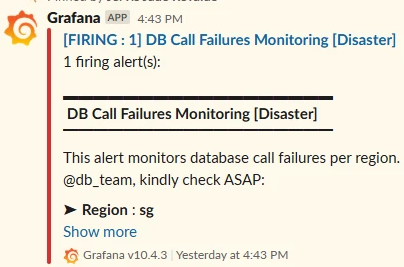

Let me walk you through what happened, why it happened, and what we learned from it.
The Setup
Our SG region runs a Windows Failover Cluster with two SQL Server nodes — PRO-DB1 and PRO-DB2 — plus a File Share Witness. The quorum mode is Node and File Share Majority, which means each of those three members gets one vote. Quorum requires at least 2 out of 3 votes, so the cluster can tolerate losing one member and still keep running.
Simple math. Solid design. What could go wrong?

The Incident
At 4:36 PM SGT, our monitoring systems flagged elevated latency and missing heartbeats from PRO-DB2. The initial assumption? Probably a transient blip. Give it a minute.
Five minutes later, it wasn't a blip.
PRO-DB2 was in a hung state and completely unresponsive. Okay, that's what failover is for, right? PRO-DB1 should just pick up the slack. Except… it didn't. PRO-DB1's Availability Group was stuck in a "Resolving" state, and the entire cluster had gone offline.
Both nodes were technically "up." But neither could do anything. It was like two people standing in front of a locked door, each waiting for the other to produce the key — and the key didn't exist.
But... Why?
Here's where it gets interesting.
When I dug into the cluster logs, I found this warning:
Cluster Log
WARN [QUORUM] Node 1: weight adjustment not performed, as all remaining voters have weight zero
And when I checked the cluster node configuration:

There it was. PRO-DB2 had a NodeWeight of 0. It had been silently stripped of its voting rights.
This wasn't something anyone had done intentionally. It was the aftermath of Forced Quorum Mode being invoked during a previous recovery event.
What Is Forced Quorum Mode, and Why Does It Do This?
If you've ever had to emergency-start a Windows Failover Cluster after losing quorum, you've probably used Forced Quorum Mode. It's the "break glass in case of emergency" option — it forces the cluster to start even when it can't achieve a normal vote majority.
The thing is, when you invoke Forced Quorum Mode, the cluster does something that's easy to overlook: it resets the NodeWeight of any nodes that weren't part of the forced start to zero. This is by design — it prevents previously offline nodes from rejoining the cluster in an uncertain state and potentially causing a split-brain scenario.
The catch?
Those weights don't automatically reset back to 1. If nobody goes in after the recovery and manually restores the node weights, they stay at zero. Indefinitely. Silently.
And that's exactly what happened to us.
How a Zero-Weight Node Broke Everything
Let's do the quorum math:
PRO-DB1: NodeWeight = 1 (can vote)
PRO-DB2: NodeWeight = 0 (cannot vote)
File Share Witness: NodeWeight = 1 (can vote)
Total possible votes: 2 (PRO-DB1 + File Share Witness). Quorum requires majority, so we need at least 2 out of 2 — meaning we need both remaining voters to agree.
Under normal circumstances, that works fine. But the moment PRO-DB1 experienced even a brief hiccup in connectivity — a transient disruption, a momentary reevaluation of cluster membership — it lost sight of the File Share Witness. And with only 1 out of 2 votes, it couldn't maintain quorum.

The failure: PRO-DB2 has no vote, PRO-DB1 can't achieve quorum alone, entire cluster goes offline.
The result:
The entire cluster went offline
PRO-DB2, though still running, was disqualified from any action due to its zero weight
PRO-DB1, while operational, entered a suspended state where its Availability Group was stuck in "Resolving" due to the cluster's offline status
Both nodes up. Zero databases available. The worst kind of outage — the kind where everything looks fine on the surface.
A Quick Aside: Why Quorum Exists (Split-Brain Prevention)
If you're wondering why the cluster doesn't just let the remaining node take over regardless of votes, it's because of something called a "Split-Brain Scenario."
Imagine a network partition where both nodes think the other one is dead. If both try to become the primary writeable node simultaneously, you end up with two separate "brains" accepting writes independently. When the network heals, those conflicting writes can't be reconciled. The result? Serious data corruption and data loss.

Quorum voting prevents this: no majority vote, no primary promotion, no split-brain.
Quorum voting exists to prevent exactly this. No majority vote? No one gets to be primary. It's the cluster's version of democracy — and sometimes, as we learned, democracy has its edge cases.
The Recovery
Our database team jumped in at 4:42 PM. After confirming the cluster state and identifying the quorum issue, a manual failover was initiated at 5:06 PM. The first attempt failed, which meant we had to restart SQL Server services and reboot PRO-DB1. The second failover attempt succeeded, and by 5:17 PM, all databases were back online.
Total impact: roughly 41 minutes of partial to full database unavailability in the SG region. Transaction processing was delayed, async queues backed up, and downstream applications couldn't connect.
The Fix
The immediate fix was almost embarrassingly simple — restore the node weight:
PowerShell(Get-ClusterNode "PRO-DB2").NodeWeight = 1One line of PowerShell. That's all it took to bring the cluster back to a healthy three-voter configuration.

Preventing This from Recurring
But the real fix is making sure this never sneaks up on us again. Here's what we put in place:
1. Post-Recovery Verification Checklist
Any time Forced Quorum Mode is used, there's now a mandatory follow-up step: verify and restore all node weights. No exceptions.
2. Proactive Monitoring for NodeWeight = 0
We set up a Zabbix alert that specifically monitors cluster nodes for a NodeWeight of zero. If any node drops to zero weight outside of a planned maintenance window, the alert fires immediately. No more silent degradation.
3. Regular Cluster Health Audits
A periodic check that validates quorum configuration, vote counts, and node weights. Think of it as a health checkup for your cluster — you don't wait until something breaks to check your blood pressure.

Quick Health Check Script
Run this periodically on your cluster nodes to catch weight anomalies early:
# Check all node weights in the cluster
Get-ClusterNode | Format-Table NodeName, NodeWeight, State -AutoSize
# Check quorum configuration
Get-ClusterQuorum | Format-List
# Alert if any node has weight 0
Get-ClusterNode | Where-Object { $_.NodeWeight -eq 0 } | ForEach-Object { Write-Warning "Node $($_.NodeName) has NodeWeight = 0!" }
Root Cause
The use of Forced Quorum Mode without follow-up verification of node weight normalization. A known side effect that was left unchecked.
Lessons Learned

In a Node and File Share Majority quorum, each member (2 nodes + 1 witness) has 1 vote, so quorum is 2 out of 3. The cluster can survive one member being unavailable. But the moment one of those votes silently disappears, the math shifts from "tolerant" to "fragile" without any visible indicator.
The lesson here isn't that Forced Quorum Mode is dangerous. It's a necessary emergency tool. The lesson is that every emergency recovery action has a cleanup step, and that cleanup step is just as important as the recovery itself. Skipping it doesn't break anything today. It plants a time bomb for tomorrow.
So if you're running Windows Failover Clusters with SQL Server Availability Groups, do yourself a favor. Go check your node weights right now:
Get-ClusterNode | ft NodeName, NodeWeight, State -AutoSizeIf you see any zeros that shouldn't be there, fix them before they fix you.


Comments