


Solving Replication’s Limits with SQL Distributed Availability Group
Updated: Feb 23
[UPDATED]
One of the major projects I was tasked with in my current role involved solving two persistent issues:
Build a redundant Numbering Lookup microservice used by multiple applications. The requirement? It must read from secondary, asynchronous, read-only replicas of NumberingDB, distributed across several regions (DC2, DC3, DC4). The primary source of truth remains NumberingDB in DC1, and our service must only query its regional replicas.
Replace SQL Replication for the ConfigDB configuration data. Currently, DC1 acts as the Publisher and DC2, DC3, DC4 have CFG_DB subscribers. But nearly everyone on the team complains about replication being difficult to maintain, fragile, and opaque when things go wrong.

It became clear that if we wanted to scale, simplify our architecture, and stop nursing replication hiccups every month, we needed something better. Enter SQL Server Distributed Availability Group (DAG).
High-level Architecture Comparison

Side-by-side Comparison
Feature | Replication | Distributed AG |
Failover | Replication breaks on failover | AGs remain connected |
Read scale-out | Not auto-enabled | Yes — with Listeners in each region |
Setup complexity | Manual setup and maintenance | Higher initial setup; once configured, fully synchronized |
Data consistency | Latency-dependent | Asynchronous commit guarantees minimal latency |
Replication type | Transactional / log shipping | AG with automatic seeding across linked AGs |
What is a Distributed Availability Group (DAG)?
In short, a SQL Server DAG lets you mirror databases from a primary data center to others, across regions, asynchronously. These secondary databases are fully readable if configured properly, without the legacy baggage of replication. Think of it as extending Always On Availability Groups across data center boundaries (AG of AGs).
You can think of it as having your cake and eating it too: high availability and regional read scale-out.
Our Use Case: Scaling ConfigDB to DC2 and DC3
To demonstrate how we implemented this, we’ll focus on ConfigDB, which we’ve already successfully deployed through DAG from DC1 to DC2 and DC3.
This setup was tested extensively in a staging environment mirroring our production environment. There was no production downtime during the rollout.
A few points of consideration:
DC2 and DC3 are hosted in GCP.
GCP's internal load balancer limitation pertaining to SQL Server, in contrast to AWS or Azure, affects how we approach our listener configuration.
We had to manually pre-check and provision storage on all nodes in DC2 and DC3 clusters to ensure ConfigDB could be hosted without issue.
Pre-Deployment Highlights
Check endpoint listeners to listen to all IP addresses

Check SQL server service account has connect access to endpoint listeners

Shared path for backup/restore of databases (using dbatools Backup-DbaDatabase and Restore-DbaDatabase)
Reserved static internal IPs for DAG listeners via GCP CLI.
Built and validated standard Always On Availability Groups (AGs) within each DC cluster (DC2 and DC3).
Configured Listeners with IPs and correct subnet masks.
Created health checks and load balancer targets to ensure apps always connect to the active node.
Followed by setting up the AG and listener in SQL Server via PowerShell and dbatools.
Create new AG and secondary IPs to be assigned for Listener for DC2 DB cluster (same code used to create DC3 AG)
### Select and reserve static private IP for DAG Listener in GCP ###
gcloud compute addresses create prod-dc2-db-dag-ip --region asia-southeast2 --subnet prod-dc2-region1 --addresses 10.XXX.X.XXX

################################
## SQL Server Always On setup ##
################################
# Names of nodes and name/IP addresses of cluster
$node1 = "PRO-DC2-DB1";
$node2 = "PRO-DC2-DB2";

# Create Availability Group and Listener in MSSQL first
# source: https://blog.ordix.de/microsoft-sql-server-setting-up-an-always-on-availability-group-with-powershell-part-4

$DomainName = 'test'
$SQLServerServiceAccount = 'test\mssql.service'
$ClusterNodes = "$node1", "$node2"
$SqlInstances = "$node1", "$node2"
$BackupPath = '\\$node1\SQLBackups'

############################
# Create AvailabilityGroup #
############################
$AGName = 'ag-dc2-forwarder'
$AGListenerName = "ag-dc2-fwdlsnr"

#Single-subnet setup
$AGListenerIP = '10.XXX.X.XXX' # get it from GCP IP prod-dc2-db-listener (see 1st step in this script)
$AGListenerSubnet = '255.255.128.0'
$AvailabilityGroup = New-DbaAvailabilityGroup `
		-Name $AGName `
    	-ClusterType Wsfc `
    	-Primary $SqlInstances[0] `
    	-Secondary $SqlInstances[1] `
    	-SeedingMode Automatic `
     -AutomatedBackupPreference Secondary `
     -AvailabilityMode SynchronousCommit `
     -FailoverMode Automatic `
     -ConnectionModeInSecondaryRole AllowReadIntentConnectionsOnly `
    	-Confirm:$false `
     -Verbose
$AvailabilityGroup | Format-List

# !!! Creating Listener usually related with headache of permissions to manage AD objects

# Common issue: Unable to Create Listener: Msg 41009 – The Windows Server Failover Clustering (WSFC) Resource Control API Returned Error Code 5057

# https://blog.sqlauthority.com/2018/03/24/ql-server-unable-to-create-listener-msg-41009-the-windows-server-failover-clustering-wsfc-resource-control-api-returned-error-code-5057/

# TODO: Grant DB cluster to modify listner record in AD first

# Follow Option 2 from article https://techcommunity.microsoft.com/t5/sql-server-support/create-listener-fails-with-message-the-wsfc-cluster-could-not/ba-p/318235
# Run it only after granting permissions above

Add-DbaAgListener -SqlInstance $SqlInstances[0] -AvailabilityGroup $AGName -Name $AGListenerName -IPAddress $AGListenerIP -SubnetMask $AGListenerSubnet -Verbose

# Set probe port for GCP Internal LB health check
$ip_resource_name = $AGName + '_' + $AGListenerIP
Get-ClusterResource -Name $ip_resource_name | Set-ClusterParameter -Name ProbePort -Value 1445
# Validate Listener IP config
Get-ClusterResource $ip_resource_name | Get-ClusterParameter

# Restart cluster resource group
Stop-ClusterGroup $AGName
Start-ClusterGroup $AGName

# Verify configuration
Get-DbaAgReplica -SqlInstance $SqlInstances[0] -AvailabilityGroup $AGName | Format-Table

# Set lower DNS TTL 5mins=300secs
Get-ClusterResource -Name ag-dc2-forwarder_ag-dc2-fwdlsnr | Set-ClusterParameter -Name HostRecordTTL -Value 300
Stop-ClusterResource -Name ag-dc2-forwarder_ag-dc2-fwdlsnr
Start-ClusterResource -Name ag-dc2-forwarder_ag-dc2-fwdlsnr


#############################################
##### GCP: Setup Internal Load Balancer #####
#############################################
# List existing health-checks if necessary
# gcloud compute health-checks list --global

# Create a health check that the load balancer can use to determine which is the active node:

# Use new Probe port 1445

gcloud compute health-checks create tcp prod-dc2-db-dag-healthcheck ^
    --check-interval="2s" ^
    --healthy-threshold=1 ^
    --unhealthy-threshold=2 ^
    --port=1445 ^
    --timeout="1s" ^
    --enable-logging ^
    --region=asia-southeast2

# Create one backend service and add the two backend instance groups
gcloud compute backend-services create prod-dc2-db-dag ^
    --load-balancing-scheme internal ^
    --region asia-southeast2 ^
    --health-checks prod-dc2-db-dag-healthcheck ^
    --health-checks-region asia-southeast2 ^
    --protocol tcp ^
    --description "Cluster IP for MSSQL DC2 DAG Listener"

gcloud compute backend-services add-backend prod-dc3-db-dag ^
    --instance-group prod-dc2-db1-grp ^
    --instance-group-zone asia-southeast2-a ^
    --region asia-southeast2

gcloud compute backend-services add-backend prod-dc2-db-dag ^
    --instance-group prod-dc2-db2-grp ^
    --instance-group-zone asia-southeast2-b ^
    --region asia-southeast2

# Create an internal load balancer to forward requests to the IP address of the listener for the active node in the Always On DAG

# !!! Do it only after adding DAG Listener to Availability Group (Add-DbaAgListener)

# static IP of DB LB prod-dc2-db-lb2

gcloud compute forwarding-rules create prod-dc2-db-dag ^
    --load-balancing-scheme internal ^
    --ports 1433 ^
    --region asia-southeast2 ^
    --network prod-dc2-vpc1 ^
    --subnet prod-dc2-sub1 ^
    --backend-service prod-dc2-db-dag ^
    --address 10.XXX.X.XXX ^
    --description "Cluster IP for MSSQL DC2 DAG Listener. Targets to primary node of DAG cluster"
DAG Creation
Once the AGs were set up in each data center, we linked them using DAG.
From DC1, we created two distributed AGs:
dag-dc1-dc2-dbcluster
dag-dc1-dc3-dbcluster
--To create distributed availability group using manual seeding
--Run this script on primary node of DC1 DB cluster
CREATE AVAILABILITY GROUP [dag-dc1-dc2-cluster]
   WITH (DISTRIBUTED)
   AVAILABILITY GROUP ON
      'ag-dc1-dbcluster' WITH
      (
         LISTENER_URL = 'TCP://ag-dc1-lsnr.aps1.ad:5022',
         AVAILABILITY_MODE = ASYNCHRONOUS_COMMIT,
         FAILOVER_MODE = MANUAL,
         SEEDING_MODE = MANUAL
      ),
      'ag-dc2-forwarder' WITH --replace with new DC2 AG name
      (
         LISTENER_URL = 'tcp://ag-dc2-fwdlsnr.aps1.ad:5022', --replace with new DC2 AG Listener URL
         AVAILABILITY_MODE = ASYNCHRONOUS_COMMIT,
         FAILOVER_MODE = MANUAL,
         SEEDING_MODE = MANUAL
      );
GO

CREATE AVAILABILITY GROUP [dag-dc1-dc3-cluster]
   WITH (DISTRIBUTED)
   AVAILABILITY GROUP ON
      'ag-dc1-dbcluster' WITH
      (
         LISTENER_URL = 'TCP://ag-dc1-lsnr.aps1.ad:5022',
         AVAILABILITY_MODE = ASYNCHRONOUS_COMMIT,
         FAILOVER_MODE = MANUAL,
         SEEDING_MODE = MANUAL
      ),
      'ag-dc3-forwarder' WITH --replace with new DC3 AG name
      (
         LISTENER_URL = 'tcp://ag-dc3-fwdlsnr.aps1.ad:5022', --replace with new DC3 AG Listener URL
         AVAILABILITY_MODE = ASYNCHRONOUS_COMMIT,
         FAILOVER_MODE = MANUAL,
         SEEDING_MODE = MANUAL
      );
GO
On the remote clusters (DC2 and DC3), we joined the distributed AG
--Join distributed availability group on second cluster (DC2 DB Clusters)
--To join distributed availability group using manual seeding
--Run this script on primary node of DC2 DB cluster
ALTER AVAILABILITY GROUP [dag-dc1-dc2-Cluster]
   JOIN
   AVAILABILITY GROUP ON
      'ag-dc1-dbcluster' WITH
      (
         LISTENER_URL = 'TCP://ag-dc1-lsnr.aps1.ad:5022',
         AVAILABILITY_MODE = ASYNCHRONOUS_COMMIT,
         FAILOVER_MODE = MANUAL,
         SEEDING_MODE = MANUAL
      ),
      'ag-dc2-forwarder' WITH --replace with new DC2 AG name
      (
         LISTENER_URL = 'tcp://ag-dc2-fwdlsnr.aps1.ad:5022', --replace with new DC2 AG Listener URL
         AVAILABILITY_MODE = ASYNCHRONOUS_COMMIT,
         FAILOVER_MODE = MANUAL,
         SEEDING_MODE = MANUAL
      );
GO


--Join distributed availability group on second cluster (DC3 DB Clusters)
--To join distributed availability group using manual seeding
--Run this script on primary node of DC3 DB cluster
ALTER AVAILABILITY GROUP [dag-dc1-dc3-Cluster]
   JOIN
   AVAILABILITY GROUP ON
      'ag-dc1-dbcluster' WITH
      (
         LISTENER_URL = 'TCP://ag-dc1-lsnr.aps1.ad:5022',
         AVAILABILITY_MODE = ASYNCHRONOUS_COMMIT,
         FAILOVER_MODE = MANUAL,
         SEEDING_MODE = MANUAL
      ),
      'ag-dc3-forwarder' WITH --replace with new DC3 AG name
      (
         LISTENER_URL = 'tcp://ag-dc3-fwdlsnr.aps1.ad:5022', --replace with new DC3 AG Listener URL
         AVAILABILITY_MODE = ASYNCHRONOUS_COMMIT,
         FAILOVER_MODE = MANUAL,
         SEEDING_MODE = MANUAL
      );
GO
Backup and Restore (Backup-DbaDatabase and Restore-DbaDatabase)
Because we opted for manual seeding, we performed a full and transaction log backup of ConfigDB from DC1 and restored them to both nodes in the other clusters with NORECOVERY.
# Restore DB
$DatabaseName = 'ConfigDB'

$Database = Get-DbaDatabase -SqlInstance PRO-DC1-DB2 -Database $DatabaseName
$Database | Backup-DbaDatabase -MaxTransferSize 4194304 -BufferCount 1024 -Path 'B:\MSSQL\Backups\DAG' -Type Full -IgnoreFileChecks
$Database | Backup-DbaDatabase -MaxTransferSize 4194304 -BufferCount 1024 -Path 'B:\MSSQL\Backups\DAG' -Type Log -IgnoreFileChecks

$FileStructure = @{
'ConfigDB' = 'E:\MSSQL\Data\ConfigDB.mdf' ##Change drive if necessary
'ConfifDB_log' = 'L:\MSSQL\Logs\ConfigDB_log.ldf' ##Change drive if necessary
}

#DC2 DB cluster
Restore-DbaDatabase -SqlInstance PRO-DC2-DB1 -MaxTransferSize 4194304 -BufferCount 1024 -NoRecovery -Path '\\PRO-DC1-DB2\SQLBackups\DAG' -DatabaseName $DatabaseName -FileMapping $FileStructure
Invoke-DbaQuery -SqlInstance PRO-DC2-DB1 -Query "ALTER DATABASE $DatabaseName SET HADR AVAILABILITY GROUP = [dag-dc1-dc2-cluster]"

Restore-DbaDatabase -SqlInstance PRO-DC2-DB2 -MaxTransferSize 4194304 -BufferCount 1024 -NoRecovery -Path '\\PRO-DC1-DB2\SQLBackups\DAG' -DatabaseName $DatabaseName -FileMapping $FileStructure
Invoke-DbaQuery -SqlInstance PRO-DC2-DB2 -Query "ALTER DATABASE $DatabaseName SET HADR AVAILABILITY GROUP = [ag-dc2-forwarder]" ##Make sure to change AG name of DC3 AG to be used for DAG

#DC3 DB cluster
Restore-DbaDatabase -SqlInstance PRO-DC3-DB1 -MaxTransferSize 4194304 -BufferCount 1024 -NoRecovery -Path '\\PRO-DC1-DB2\SQLBackups\DAG' -DatabaseName $DatabaseName -FileMapping $FileStructure
Invoke-DbaQuery -SqlInstance PRO-DC3-DB1 -Query "ALTER DATABASE $DatabaseName SET HADR AVAILABILITY GROUP = [dag-dc1-dc3-cluster]"

Restore-DbaDatabase -SqlInstance PRO-DC3-DB2 -MaxTransferSize 4194304 -BufferCount 1024 -NoRecovery -Path '\\PRO-DC1-DB2\SQLBackups\DAG' -DatabaseName $DatabaseName -FileMapping $FileStructure
Invoke-DbaQuery -SqlInstance PRO-DC3-DB2 -Query "ALTER DATABASE $DatabaseName SET HADR AVAILABILITY GROUP = [ag-dc3-forwarder]" ##Make sure to change AG name of DC3 AG to be used for DAG
Check forwarder, ConfigDB database should be restoring state for a while on DC2 and DC3. If not, check permission if the availability group have access to create database.
--PRO-DC2-DB1
ALTER AVAILABILITY GROUP [ag-dc1-dbcluster] GRANT CREATE ANY DATABASE
ALTER AVAILABILITY GROUP [ag-dc2-forwarder] GRANT CREATE ANY DATABASE --replace with new DC2 AG name
--PRO-DC3-DB1
ALTER AVAILABILITY GROUP [ag-dc1-dbcluster] GRANT CREATE ANY DATABASE
ALTER AVAILABILITY GROUP [ag-dc3-forwarder] GRANT CREATE ANY DATABASE --replace with new DC3 AG nameMonitoring DAG Health
We tracked sync status using the standard DMV queries like:
Run this query on the Global Primary (DC1 primary node)
--1 shows underlying performance of distributed AG
SELECT
   ag.[name] AS [Distributed AG Name],
   ar.replica_server_name AS [Underlying AG],
   dbs.[name] AS [Database],
   ars.role_desc AS [Role],
   drs.synchronization_health_desc AS [Sync Status],
   drs.log_send_queue_size,
   drs.log_send_rate,
   drs.redo_queue_size,
   drs.redo_rate
FROM sys.databases AS dbs
INNER JOIN sys.dm_hadr_database_replica_states AS drs
   ON dbs.database_id = drs.database_id
INNER JOIN sys.availability_groups AS ag
   ON drs.group_id = ag.group_id
INNER JOIN sys.dm_hadr_availability_replica_states AS ars
   ON ars.replica_id = drs.replica_id
INNER JOIN sys.availability_replicas AS ar
   ON ar.replica_id = ars.replica_id
WHERE ag.is_distributed = 1;
GO

--2 shows endpoint url and sync state for ag, and dag
SELECT
   ag.name AS group_name,
   ag.is_distributed,
   ar.replica_server_name AS replica_name,
   ar.endpoint_url,
   ar.availability_mode_desc,
   ar.failover_mode_desc,
   ar.primary_role_allow_connections_desc AS allow_connections_primary,
   ar.secondary_role_allow_connections_desc AS allow_connections_secondary,
   ar.seeding_mode_desc AS seeding_mode
FROM sys.availability_replicas AS ar
JOIN sys.availability_groups AS ag
   ON ar.group_id = ag.group_id;
GO

 --3 verifies the commit state of the distributed availability group
 select ag.name, ag.is_distributed, ar.replica_server_name, ar.availability_mode_desc, ars.connected_state_desc, ars.role_desc,
 ars.operational_state_desc, ars.synchronization_health_desc from sys.availability_groups ag
 join sys.availability_replicas ar on ag.group_id=ar.group_id
 left join sys.dm_hadr_availability_replica_states ars
 on ars.replica_id=ar.replica_id
 where ag.is_distributed=1
 GO

-- 4. Run this query on the Global Primary and the forwarder
-- Check the results to see if synchronization_state_desc is SYNCHRONIZED, and the last_hardened_lsn is the same per database on both the global primary and forwarder
-- If not rerun the query on both side every 5 seconds until it is the case
SELECT ag.name
       , drs.database_id
       , db_name(drs.database_id) as database_name
       , drs.group_id
       , drs.replica_id
       , drs.synchronization_state_desc
       , drs.last_hardened_lsn
FROM sys.dm_hadr_database_replica_states drs
INNER JOIN sys.availability_groups ag on drs.group_id = ag.group_id;
Run this query on the Forwarder (DC2 or DC3 primary node)
--1 shows sync status of distributed AG
SELECT
   ag.[name] AS [AG Name],
   ag.is_distributed,
   ar.replica_server_name AS [Underlying AG],
   ars.role_desc AS [Role],
   ars.synchronization_health_desc AS [Sync Status]
FROM  sys.availability_groups AS ag
INNER JOIN sys.availability_replicas AS ar
   ON  ag.group_id = ar.group_id
INNER JOIN sys.dm_hadr_availability_replica_states AS ars
   ON  ar.replica_id = ars.replica_id
WHERE ag.is_distributed = 1;
GO

--2 shows endpoint url and sync state for ag, and dag
SELECT
   ag.name AS group_name,
   ag.is_distributed,
   ar.replica_server_name AS replica_name,
   ar.endpoint_url,
   ar.availability_mode_desc,
   ar.failover_mode_desc,
   ar.primary_role_allow_connections_desc AS allow_connections_primary,
   ar.secondary_role_allow_connections_desc AS allow_connections_secondary,
   ar.seeding_mode_desc AS seeding_mode
FROM sys.availability_replicas AS ar
JOIN sys.availability_groups AS ag
   ON ar.group_id = ag.group_id
WHERE ag.is_distributed = 1
GO

 --3 verifies the commit state of the distributed availability group
 select ag.name, ag.is_distributed, ar.replica_server_name, ar.availability_mode_desc, ars.connected_state_desc, ars.role_desc,
 ars.operational_state_desc, ars.synchronization_health_desc from sys.availability_groups ag
 join sys.availability_replicas ar on ag.group_id=ar.group_id
 left join sys.dm_hadr_availability_replica_states ars
 on ars.replica_id=ar.replica_id
 where ag.is_distributed=1
 GO

-- 4. Run this query on the Global Primary and the forwarder
-- Check the results to see if synchronization_state_desc is SYNCHRONIZED, and the last_hardened_lsn is the same per database on both the global primary and forwarder
-- If not rerun the query on both side every 5 seconds until it is the case
SELECT ag.name
       , drs.database_id
       , db_name(drs.database_id) as database_name
       , drs.group_id
       , drs.replica_id
       , drs.synchronization_state_desc
       , drs.last_hardened_lsn
FROM sys.dm_hadr_database_replica_states drs
INNER JOIN sys.availability_groups ag on drs.group_id = ag.group_id;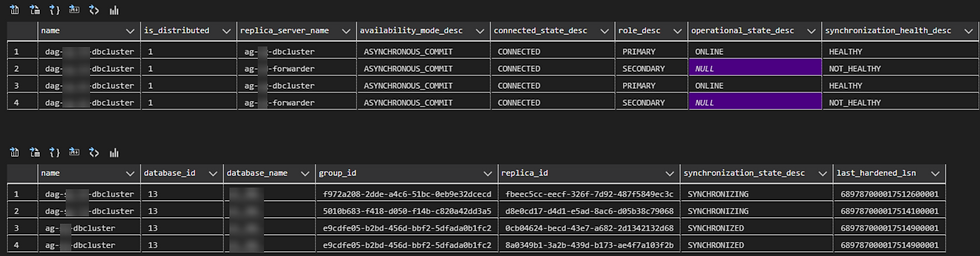

Post-Work: Logins, Compatibility, Sector Sizes
Once ConfigDB was live in DC2 and DC3, we synced logins using Copy-DbaLogin.
Copy-DbaLogin -Source 'PRO-DC1-DB2' -Destination PRO-DC2-DB1,PRO-DC2-DB2,PRO-DC3-DB1,PRO-DC3-DB2 -ExcludeSystemLoginsWe also had to deal with a misalignment issue on the log drive's physical sector sizes across clusters, causing excessive fallback to synchronous IO:

Fix
Move log files to new log drive with 64KB Allocation Unit Size.
Enable Trace flag 1800 and add as startup parameter in DC1 Prod. As per MS recommendation, TF 1800 should be used as a startup flag on all servers or replicas that have 512-byte physical sector size and restarted.
Though ConfigDB database has been scaled out to DC2 and DC3 regions, synchronization might be slow due to misaligned log IOs, a known issue when disks have different sector sizes for primary (DC1) and secondary (DC2 & DC3) log drives in SQL Server AG environments.
There have been 14047232 misaligned log IOs which required falling back to synchronous IO. The current IO is on file L:\MSSQL\Logs\ConfigDB_log.ldf.
In mixed environments, where the secondary has a physical sector of 512 bytes and the primary has a sector size of 4 KB, TF 1800 should be used as a startup flag on all servers or replicas that have 512-byte physical sector size and restarted. This makes sure that the ongoing log creation format uses a 4-KB sector size.
Connection Strings
Applications targeting ConfigDB now connect via:
Server=ag-dc2-fwdlsnr;Database=ConfigDB;ApplicationIntent=ReadOnlyThis is key. Without the ApplicationIntent=ReadOnly;Database=ConfigDB, SQL Server may reject the connection to the secondary replica.
Handling Agent Jobs and Errors
One thing that caught us off guard: agent jobs.
Some jobs using TSQL steps failed with error 978:
The database is in an availability group and is currently accessible only for read-only connections.
To fix this, we had to convert those job steps to CmdExec and use sqlcmd with -K ReadOnly:
sqlcmd -S ag-dc2-fwdlsnr -E -d ConfigDB -K ReadOnly -Q "EXEC some_stored_proc"This workaround ensures the job executes in the context of a read-only replica.
Summary
ConfigDB is now a distributed, read-only DAG replica in DC2 and DC3.
CFG_DB (replication-based) is still running, but being phased out.
DAG improves on replication by offering:
Asynchronous sync across regions
Simplified management
Read scaling out-of-the-box
All new connections should use the listener name and include ApplicationIntent=ReadOnly;Database=ConfigDB.
What's Next?
We’ll be gradually retiring CFG_DB and migrating all configuration consumers to query ConfigDB through its regional DAG replica.
There’s still cleanup to do, but the major pieces are now in place. This shift sets the foundation for a more scalable and easier-to-maintain data platform.
If you’re thinking of adopting DAG for cross-region scaling in SQL Server, feel free to reach out. Happy to share what worked (and what didn’t).


Comments