


How I Built an End-to-End Database CI/CD Pipeline with AI-Generated Migration Scripts
Updated: Feb 23
[UPDATED]
Database deployments have always been the weak link in most CI/CD pipelines. Application code gets automated pipelines, blue-green deployments, and rollback strategies from day one. Databases? They still get a DBA manually executing scripts, a process that doesn't scale, burns productive hours, and leaves too much room for human error. That workflow needs to be automated, but done carefully, because a bad database deployment can do far more damage than a bad application deployment.
I spent the better part of a year building something different: a fully automated, end-to-end CI/CD pipeline for a SQL Server database with over hundreds of schemas and thousands of objects. The pipeline uses AI (Claude API) to generate migration scripts, validates them against SQL best practices before they ever reach a reviewer, and deploys through staging and production with full version tracking and approval gates.
This post walks through how the whole thing works, from the first commit to production deployment.
The Problem I Was Solving
Our database had the usual growing pains. Multiple engineers making schema changes across different branches. Migration scripts written by hand, inconsistently formatted, sometimes missing idempotency checks. Version conflicts when two PRs targeted the same deployment window. And the deployment itself was a multi-step manual process that required someone to write the migration scripts, then execute them one by one across every production server, monitor the output, and no tracking tables in place. That's time spent on repetitive process instead of actual engineering work.
I wanted a pipeline where an engineer could modify a stored procedure or add a table, open a PR, and have everything else happen automatically — script generation, validation, version assignment, staging deployment, and production deployment. No manual script writing. No back-and-forth in code review over syntax errors, missing idempotency checks, or SQL best practice violations. The pipeline catches all of that before a reviewer ever sees the PR. No version conflicts at merge time.
The Architecture at a Glance
The pipeline spans two platforms — GitHub Actions for the early stages and Jenkins for the deployment stages — connected by webhooks. Here's the full flow:

Step 1-3: The Developer Workflow
Engineers don't write migration scripts. They work directly on the source SQL files in the repository, organized by schema:
DatabaseProject/
  schema/
    Tables/
      VirtualNumber.sql
    Stored Procedures/
      VirtualNumber_Insert.sql
    Views/
      vwVirtualNumber.sql
  schema_billing/
    Tables/
      BillingPrefix.sql
  ...
You create a branch, make your changes, push, and open a PR against master. That's it. Everything else is automated.
Step 4: AI-Generated Migration Scripts (GitHub Actions)
This is where things get interesting — and the part that draws the most questions — so it's worth breaking down in detail.
Whenever a PR is opened or updated with changes to any .sql file in the database project directory, a GitHub Actions workflow kicks in automatically. It handles the entire migration script lifecycle end to end:

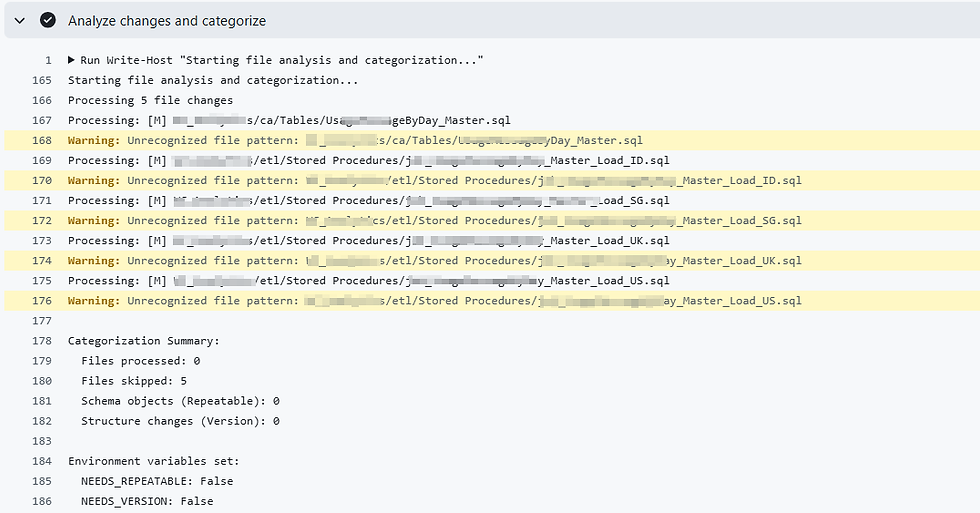
Change Detection & Categorization
The workflow diffs the PR branch against master and classifies every changed file following Flyway's migration naming conventions:
Repeatable migrations (R__ prefix): Views, stored procedures, functions, triggers. Flyway re-applies these whenever the file content changes, so they use CREATE OR ALTER for safe re-execution.
Version migrations (V__ prefix): Tables, indexes, foreign keys, synonyms, user-defined types. Flyway runs these exactly once in sequential order, so each script includes idempotency checks to prevent failures on re-run.
It also handles deleted files by retrieving their content from origin/master so it can generate proper DROP statements.

Claude API Call

The workflow builds a prompt containing the changed file contents, diffs for modified files, the branch name, the database name, and a set of rules about SQL best practices. It sends this to the Claude API (Opus latest model, temperature 0 for deterministic output) and gets back properly formatted migration scripts.
The prompt is compressed and specific. It tells Claude exactly which idempotency patterns to use:
-- Tables:
IF NOT EXISTS (SELECT 1 FROM sys.objects
    WHERE object_id = OBJECT_ID(N'schema.TableName') AND type = 'U')
BEGIN
    CREATE TABLE schema.TableName (...)
END
GO

-- Indexes:
IF NOT EXISTS (SELECT 1 FROM sys.indexes
    WHERE name = 'IX_Name' AND object_id = OBJECT_ID('schema.Table'))
BEGIN
    CREATE NONCLUSTERED INDEX IX_Name ON schema.Table(Column)
    WITH (FILLFACTOR = 95, ONLINE = ON (...))
END
GO
For modified files (status M), Claude analyzes the diff — not the full file content — and generates only the specific ALTER/ADD/DROP operations for what actually changed. It doesn't recreate objects that already exist.
Version Calculation
Before calling the API, the workflow scans the Migration/ folder for existing version files and calculates the next available version number. The format is V{major}.{minor} where major ranges 1-999 and minor is a 5-digit zero-padded number (00001-99999). When minor hits 99999, major increments and minor resets.

SQL Validation
After generation, the scripts go through automated validation:
Every CREATE TABLE must have a PRIMARY KEY
All BEGIN blocks must have matching END blocks
Data types must have length specifications (no bare VARCHAR())
Triggers that insert from INSERTED must use COALESCE for NULL handling
Execution order must be correct: schema → tables → constraints → triggers → data
Repeatable migrations must use CREATE OR ALTER
New schemas must include CREATE SCHEMA with existence checks
Critical errors fail the workflow. The PR is blocked. The engineer sees exactly what went wrong in the PR comment. Warnings are flagged but don't block the PR.

Auto-Commit & PR Comment
If validation passes, the generated scripts are committed back to the PR branch. A detailed comment is posted on the PR showing validation status, script names, and next steps.
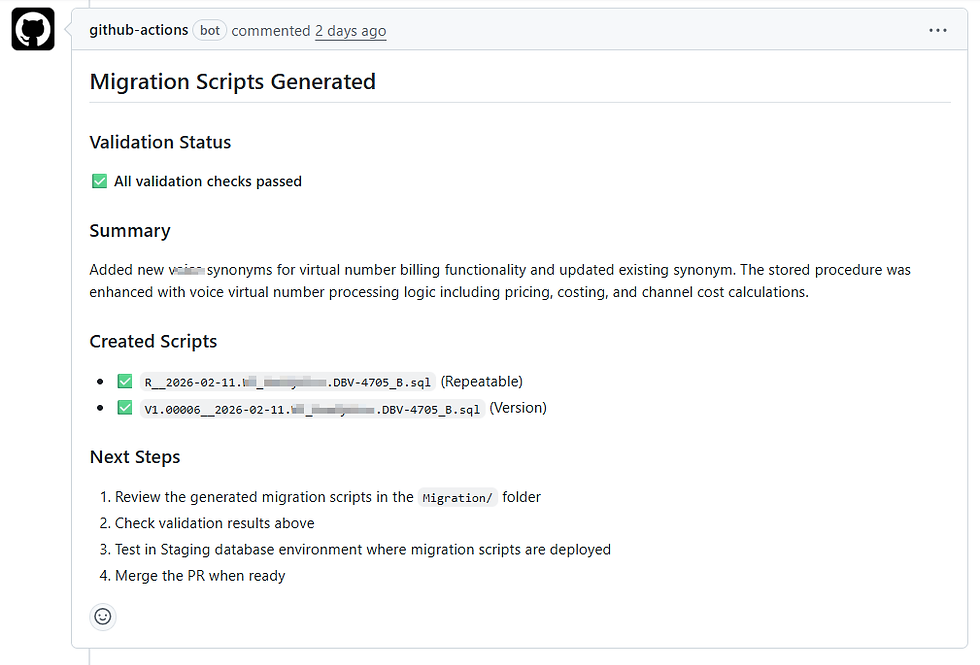
The workflow also handles some things automatically that you'd normally catch in code review:
Updates the Visual Studio project file (.sqlproj) with wildcard patterns for new schema directories
Detects new schemas and auto-grants CI/CD role permissions for them
Cleans up old migration scripts from previous pushes on the same branch (one script per branch, always)
Step 5-6: Build Pipeline (Jenkins)


In parallel with the migration script generation, the PR triggers a Jenkins build pipeline. This compiles the SSDT project using MSBuild to catch any syntax errors that the Visual Studio project would flag — missing references, invalid object names, broken cross-schema dependencies.
Build status is reported back to GitHub as a commit status check. Both the migration generation and the build must pass before the PR can be approved.

Step 7: PR Review & Approval
At this point, the reviewer sees:
The source SQL changes (the actual schema modifications)
The auto-generated migration scripts in the Migration/ folder
A PR comment with validation results
Green checks from both the migration generation workflow and the build pipeline
The reviewer focuses on business logic and correctness — not script formatting or whether someone remembered to add an IF EXISTS check.

Steps 8-10: Staging Pipeline (Jenkins)
When the PR is approved, a GitHub Actions workflow detects the pull_request_review: submitted event with state approved, grabs a CSRF crumb from Jenkins, and triggers the staging management pipeline via the Jenkins API.

Staging Management
This pipeline does the heavy lifting of version control:

Merge latest master into the PR branch to catch any conflicts from other deployments
Run migration management — the PowerShell script that handles version tracking:
Validates migration script dates and renames them to current date if needed
Checks the VersionHistory table for existing versions
Handles version conflicts: if a version number is already taken by a deployed migration, it automatically reassigns to the next available number
Records everything in the tracking table
Validate migration order against the database's Flyway schema history
Push updated scripts back to the PR branch
Archive artifacts for the deployment pipeline


Staging Deployment
Once management completes successfully, it automatically triggers the staging deployment pipeline. This pipeline:
Fetches the archived migration artifacts from the management pipeline
Checks out deployment scripts from the PR branch
Runs custom PowerShell script to automatically execute migration scripts to staging database (ordered by execution — Versioned then Repeatable scripts)
Updates the VersionHistory table with deployment status
The staging deployment uses a dedicated CI/CD SQL login with least-privilege permissions — it can create and modify objects within schemas, but it cannot drop entire schemas, grant permissions to other users, or perform any server-level operations. This limits the blast radius if credentials were ever compromised.

Steps 11-12: Production Pipeline (Jenkins)
When the PR is merged to master, a GitHub Actions workflow triggers the production Jenkins pipeline. This one has an explicit approval gate:
A Slack notification goes out to the team channel requesting deployment approval
An authorized approver has a 2-day window to click "DEPLOY" or "ABORT" in Jenkins
If nobody acts within 2 days, the deployment is automatically disabled
Once approved, Flyway runs against the production database. The pipeline captures the pre-migration and post-migration Flyway schema versions, parses the output for deployed version numbers, and updates the VersionHistory table accordingly.
On success: IsDeployed = 1, DeployNote = 'Successfully deployed'.
On failure: IsDeployed stays at 0, and the DeployNote captures the error message for manual review. The pipeline exits cleanly rather than retrying — failed database migrations need human eyes before a retry.

Version Conflict Resolution
This was one of the trickier problems to solve. When multiple branches are in flight, two PRs can end up with the same version number. The pipeline handles this automatically:
Scenario: Branch A has V1.00005, Branch B also generated V1.00005

Branch A gets approved and deployed first.
  -> V1.00005 is now deployed.

Branch B gets approved next.
  -> Pipeline detects V1.00005 is already deployed.
  -> Automatically reassigns to V1.00006.
  -> Renames the physical SQL file.
  -> Records the reassignment in VersionHistory with a note:
     "Reassigned from V1.00005 - version already deployed"
This happens transparently. The engineer doesn't need to do anything. The pipeline also validates that no version gaps exist before allowing a deployment to proceed.
The Security Model
The CI/CD pipeline uses a dedicated SQL Server login with a custom database role. The permission model follows the principle of least privilege:
Can Do | Cannot Do |
Create/alter tables, views, procedures, functions | DROP entire schemas |
Create new schemas | Grant/revoke permissions to other users |
Drop individual objects (mitigated by code review) | Transfer schema ownership |
Execute stored procedures, read/write data | DROP DATABASE, backup/restore |
Create foreign keys and indexes | Create logins or modify server settings |
The key decision was explicitly not granting CONTROL ON SCHEMA. That single permission would enable dropping entire schemas, privilege escalation, and ownership hijacking. Without it, a compromised credential can damage individual objects (recoverable from version control) but can't wipe out an entire schema or create backdoor access.
Notification Flow
Every pipeline stage sends Slack notifications to a dedicated channel:
Build started: Branch name, PR author, commit link
Build passed/failed: Status with link to Jenkins logs

Staging management completed: PR number, approver'

Staging deployment approval requested: Requires @here attention
Staging deployment completed/failed

Production approval requested
Production deployment completed/failed

The team always knows where things stand without checking Jenkins manually.
What I Learned Building This
AI-generated scripts need guardrails, not trust
Claude generates solid migration scripts, but the validation layer is non-negotiable. The AI occasionally misses edge cases — a trigger that needs COALESCE for null safety, a column modification that forgets to drop the dependent unique constraint first. The automated validation catches these before they reach a human reviewer.
Version management is harder than deployment
Getting Flyway to run a script is easy. Making sure 5 concurrent branches don't step on each other's version numbers while maintaining a strict sequential order — that's the actual problem. The reassignment logic took several iterations to get right.
Least privilege matters more for automation than for humans
A human DBA making a mistake is one query. An automated pipeline with elevated permissions running a bad script can be catastrophic at scale. The security model was designed specifically around "what's the worst case if this credential leaks?"
The approval gate is a feature, not friction
Production deployments require explicit approval with a 2-day window. Some teams would see this as slowing things down. In practice, it gives the team confidence that nothing hits production without a conscious decision. The 2-day expiry also prevents stale deployments from sitting around indefinitely.
The Tech Stack
Component | Technology |
Database | SQL Server 2022 |
Migration tool | Flyway |
CI/CD orchestration | GitHub Actions + Jenkins |
Migration script generation | Claude API (Anthropic) |
Build/compile | MSBuild / SSDT |
Automation scripts | PowerShell |
Pipeline definitions | Jenkinsfile (Groovy) + YAML workflows |
Version tracking | Custom VersionHistory table + Flyway schema history |
Notifications | Slack |
Results
Since rolling this out:
Zero manual migration script writing. Engineers modify source files. The pipeline does the rest.
Version conflicts resolved automatically. No more "hey, can you bump your version number?" messages.
Deployment failures are traceable. Every version has a history record with deployment status, timestamps, and error details.
Code review focuses on logic, not formatting. Reviewers check business correctness, not whether someone remembered a GO statement.
Full audit trail. Every deployment, every version reassignment, every approval is logged and trackable.
What's Next
There are a few things I want to add:
Automated rollback generation — reverse migration scripts generated alongside forward migrations
Drift detection — comparing the actual database state against the expected state from version control
Multi-database support — extending the same pipeline to other databases in the platform
But the foundation is solid. The pipeline handles the daily reality of multiple engineers shipping database changes without stepping on each other, and it does it without anyone writing a migration script by hand.
If you're building something similar or have questions about any of the components, feel free to reach out. Database CI/CD is still an underserved area, and the more teams share what works, the better off we all are.


Comments